CRA to Vite Migration Journey (or as I call it, a debugging adventure)
I'd like to share my experience migrating a large project with around 1500 files to Vite. This project was created 5 years ago using CRA (create-react-app). Here are the specific package specifications:
{
  "name": "...",
  "version": "0.1.0",
  "dependencies": {
    "@types/lodash": "^4.14.149",
    "@types/node": "^12.0.0",
    "@types/react": "^18.2.79",
    "@types/react-dom": "^18.2.25",
    "@types/react-redux": "^7.1.7",
    "@types/react-router-dom": "^5.1.3",
    "@types/styled-components": "^5.0.1",
    "axios": "^0.19.2",
    "classnames": "^2.2.6",
    "date-fns": "^2.16.1",
    "dayjs": "^1.10.7",
    "lodash": "^4.17.20",
    "moment": "^2.27.0",
    "react": "^18.2.0",
    "react-dom": "^18.2.0",
    "react-redux": "^7.2.0",
    "react-router-dom": "^5.1.2",
    "react-scripts": "^5.0.1",
    "redux": "^4.0.5",
    "styled-components": "^5.0.1",
    "typescript": "3.8"
  },
  "scripts": {
    "start": "cp .env.localhost .env.development.local; react-scripts start",
    "build": "react-scripts build --max_old_space_size=4096; rm -rf dist; mv -f build dist",
    "test": "react-scripts test",
    "eject": "react-scripts eject",
    "prettier": "prettier \"**/*.{js,ts,tsx}\" --write"
  },
  "eslintConfig": {
    "extends": "react-app"
  }
}
Before diving in, let me explain why we decided to migrate from CRA to Vite:
- We wanted to solve issues like Cache Busting that CRA had
- Hot Reloading wasn't working for some unknown reason. We couldn't identify the cause, and had to refresh the page every time while handling incoming tasks
- We also considered Next.js, but the immediate changes required were too significant (router configuration, middleware, etc.), so we planned to migrate to Vite first and then gradually adopt Next.js later
Ultimately, we wanted to tackle this inevitable task sooner rather than later. From a developer's perspective, the non-functional HMR was the most inconvenient issue.
The pressure of transforming a large legacy project with (relatively) modern technology was real, so we had to establish a detailed plan and clearly define our desired outcomes.
- Remove CRA remnants (react-scripts) after Vite adoption
- Update TypeScript version: minimum 5.0, maximum 5.5
- Package replacements
- Replace lodash with lighter libraries
- Unify date-related libraries (dayjs, moment, date-fns, etc.)
- Remove old syntax like React.FC and convert class components to functional components
- Code splitting
- Update other outdated library versions
- Code conventions
- Centralize scattered types and constants
- Fix code importing from tsconfig absolute paths to relative paths
- Replace JavaScript alert() with toastify
- Remove unused code
After careful consideration, we decided to achieve these goals in the listed order and implemented them at the code level. This article covers only Vite adoption, react-scripts removal, and other refactoring.
First, install Vite via command:
yarn add -D vite @vitejs/plugin-react
After installation, remove react-scripts as it's no longer needed:
yarn remove react-scripts
Then update the scripts in package.json. Here's the original:
"scripts": {
	"start": "cp .env.localhost .env.development.local; react-scripts start",
	"start:dev": "cp .env.develop .env.development.local; react-scripts start",
	"build": "react-scripts build --max_old_space_size=4096; rm -rf dist; mv -f build dist",
	"build:dev": "cp .env.develop .env.production.local; react-scripts build --max_old_space_size=4096; rm -rf dist; mv -f build dist",
	"build:patch": "cp .env.patch .env.production.local; react-scripts build --max_old_space_size=4096; rm -rf dist; mv -f build dist",
	"build:stg": "cp .env.stg .env.production.local; react-scripts build --max_old_space_size=4096; rm -rf dist; mv -f build dist",
	"build:product": "cp .env.production .env.production.local; react-scripts build --max_old_space_size=4096; rm -rf dist; mv -f build dist",
	"test": "react-scripts test",
	"eject": "react-scripts eject",
	"prettier": "prettier \"**/*.{js,ts,tsx}\" --write"
},
Change to Vite commands:
"scripts": {
	"dev": "cp .env.localhost .env.development.local; vite start",
	"build": "tsc && vite build --max_old_space_size=4096; rm -rf dist; mv -f build dist",
	"prettier": "prettier \"**/*.{js,ts,tsx}\" --write"
},
After removing the start command and replacing it with dev, the project will now run with yarn dev.
Vite separates type checking and the build process for performance benefits. While you can omit tsc, doing so might result in successful builds even with type errors. Therefore, if you want to check types before building for project stability, you should add tsc && before the build command. (Of course, running tsc && build takes a bit more time than just the build command.)
Next, create the Vite configuration file vite.config.ts in the root directory with the following code.
While the configuration has more settings now, we'll only cover the basic setup at this point.
import { defineConfig } from 'vite';
import react from '@vitejs/plugin-react';

// https://vitejs.dev/config/
export default defineConfig({
  plugins: [react()],
  server: {
    host: 'localhost',
    port: 3000,
    open: true,
    strictPort: true,
  },
  build: {
    outDir: 'dist',
  },
});
Vite opens on port 5173 by default. To match the existing development environment, set the port to 3000. Without any configuration, it defaults to 5173.
open: true automatically opens the browser when the server starts.
strictPort: true determines whether to open an alternative port (like 3001) when port 3000 is already in use by another dev server. Setting it to true prevents opening alternative ports.
You also need to add Vite syntax to tsconfig.json:
{
  "compilerOptions": {
    "types": ["@emotion/react/types/css-prop", "vite/client"]
  },
  "include": ["src", "vite.config.ts"]
}
Add vite/client to the compile options so TypeScript can recognize Vite, and add vite.config.ts to includes.
Remove the react-app-env.d.ts file and create vite-env.d.ts in the root. This file helps TypeScript understand Vite's specific global variables and features.
/// <reference types="vite/client" />
Next, move the public/index.html file to the root path. Also, remove the %PUBLIC_URL% syntax from the file.
<div id="root"></div>
<script type="module" src="/src/index.tsx"></script>
Due to the bundling differences between CRA (which uses Webpack) and Vite, Vite requires directly adding the entry point in the script tag.
So far, we've completed the basic Vite setup and removed traces of the no-longer-needed react-scripts package.
Now comes the repetitive process of modifying code, running builds to check for errors, starting the server to verify successful builds, and confirming the server runs properly.
First, run the build command yarn build before executing the dev command.
Error 1
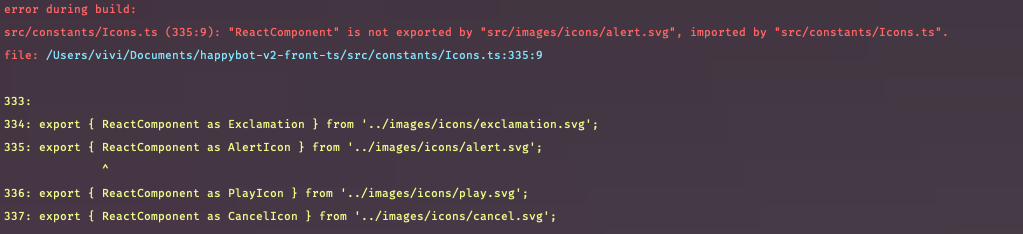
CRA has webpack's SVGR loader built-in to automatically convert SVGs to React components, but Vite only processes SVGs as simple URL strings. Therefore, the error occurs because the named export { ReactComponent } doesn't exist.
Install svgr:
yarn add -D vite-plugin-svgr
Add to vite-env.d.ts:
/// <reference types="vite/client" />
/// <reference types="vite-plugin-svgr/client" />
/// <reference types="./Icons.d.ts" />
Add to vite.config.ts:
import { defineConfig } from 'vite';
import react from '@vitejs/plugin-react';
import svgr from 'vite-plugin-svgr';

import path from 'path';

export default defineConfig({
	plugins: [react(), svgr()], // This part
		...
});
Change the export statement from default in the problematic file:
export { ReactComponent as Exclamation } from '../images/icons/exclamation.svg';
to:
export { default as Exclamation } from '../images/icons/exclamation.svg?react';
Error 2
After building, the second error occurs:
vite Rollup failed to resolve import "components/common/Topbar" from "/Users/vivi/Documents/repo_name/src/pages/Auth/Agree/index.tsx". This is most likely unintended because it can break your application at runtime.

I fixed this error by referring to this link: Reference link
Add absolute path configuration by changing the alias settings in vite.config.ts:
resolve: {
	alias: {
		components: path.resolve(__dirname, './src/components'),
		constants: path.resolve(__dirname, './src/constants'),
		hooks: path.resolve(__dirname, './src/hooks'),
		images: path.resolve(__dirname, './src/images'),
		modules: path.resolve(__dirname, './src/modules'),
		services: path.resolve(__dirname, './src/services'),
		pages: path.resolve(__dirname, './src/pages'),
	},
},
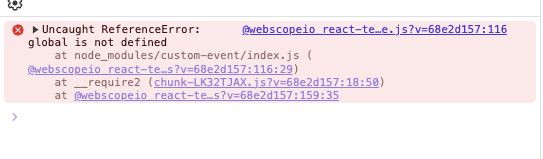
Then another sudden error appears when running the build. To fix this, add the following to vite.config.mts:
define: {
	global: 'globalThis',
},
The global value replaces any global identifier in the code with globalThis.
globalThis is a standard global object introduced in ECMAScript 2020 (ES11) that can be used across all environments including browsers and Node.js. Some Node.js-based libraries try to reference the global object in browser environments, causing errors. This setting automatically replaces all global references with globalThis to ensure browser compatibility.
Next, there's one thing I forgot before running the build - changing all env files.
This involves converting the REACT_APP prefix to VITE. While you could keep using REACT_APP, for clarity, I changed it to VITE and converted all process.env to import.meta.env.
*as is*
process.env.REACT_APP_API_PATH

*to be*
import.meta.env.VITE_API_PATH
After completing this work, take a breath and run the next build. At error #3, most errors are gone, with only warning lines remaining. Circular reference issues in barrel files were detected.
For an easy understanding of what barrel files are and why they should be avoided, check this link: https://tkdodo.eu/blog/please-stop-using-barrel-files
In summary, circular reference problems occur when one file references another file. Since this is a warning rather than an error, I'll fix this code to prevent potential performance degradation.
The warning situation at the time:

/** Elements */

export { default as Divider } from './Divider';
export { default as Panel } from './Panel';
...
export { default as Input } from './Input';
export { default as Tooltip } from './Tooltip';
export { default as Table } from './Table';
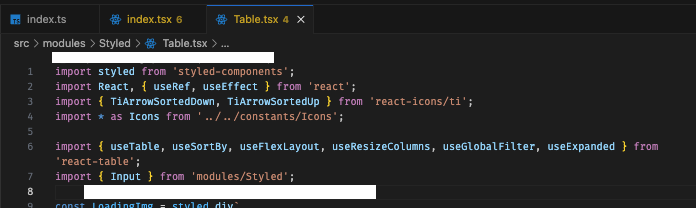
The Table.tsx file was referencing Input from the same index.ts barrel file being exported, causing the circular reference issue.
I fixed this by importing directly from Input.tsx instead of index.ts to break the circular reference. I modified numerous files this way. In some cases, I even deleted the index.ts files entirely.
At this point, the build succeeds with two error messages and one warning fix. Let's measure the chunk size after building:
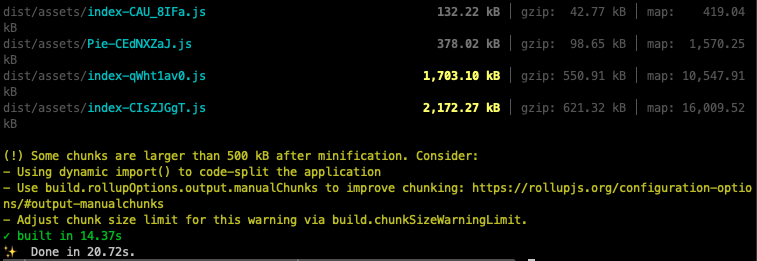
While Vite's build time is significantly reduced compared to CRA (100s+), the chunk sizes are excessively large.
Due to the large chunk sizes, I added some build-related settings to vite.config.mts for accurate measurement:
build: {
	outDir: 'dist',
	sourcemap: true,
	manifest: true,
},
This creates a .vite folder and manifest.json file in dist after building. Let's examine the file for accurate information.
Looking at the second largest file (1,703kb) first:
"_index-CIsZJGgT.js": {
	"file": "assets/index-CIsZJGgT.js", // Actual output
	"name": "index", // Entry point
	"isDynamicEntry": true, // Dynamic
	"imports": [ // Referenced modules
		"index.html",
		...
	],
	"dynamicImports": [ // Other modules that can be loaded with dynamic import
		...
	],
	"css": [
		"assets/index-DhZwF7rb.css"
	],
	"assets": [
		"assets/top-logo@3x-C6ZpEqmc.png",
		"assets/img-slide-01@2x-Ln4SbJfP.png",
		"assets/img-slide-01@3x-DYcioUSv.png",
		"assets/text-ok@2x-B1PkcUtI.png",
		"assets/text-ok@3x-BIqLhKB1.png",
		"assets/img-tu-02@2x-xNyGbzr8.png",
		"assets/img-tu-02@3x-XNz_kcfa.png",
		"assets/text-editor@2x-Cw7S8w9P.png",
		"assets/text-editor@3x-DVHGYXdC.png",
		"assets/ars-logo-C9Qvq3d1.svg",
		"assets/loading_50-Ch3-uIdb.gif",
		"assets/loading_100-DQdymZYW.gif",
		"assets/loading_150-C0FpNRej.gif"
	]
},
You can see which files are being used according to each field. By checking manifest.json, you can identify large file chunk names -> understand which files comprise that chunk. While the names are hashed, they're still recognizable enough to check the files and optimize them if possible. If files are too large, you can split them, and find reusable logic for refactoring. Running the build command again shows slightly reduced chunk sizes.
Now that we've mostly fixed errors, let's start the bundle size diet in earnest. The criterion for "large" bundles uses the default value of 500kb. A warning appears if the built bundle size exceeds 500kb. The diet isn't anything special - just optimization, refactoring, using common functions, or breaking down components into smaller units. Since the project I was working on had many files containing thousands of lines of code, I thought separating dependencies would have a significant effect.
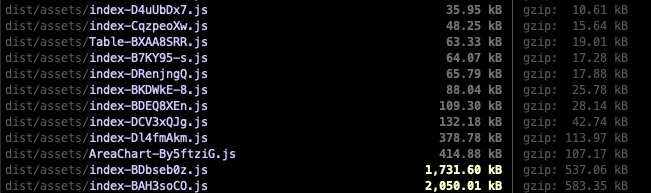
Before diet
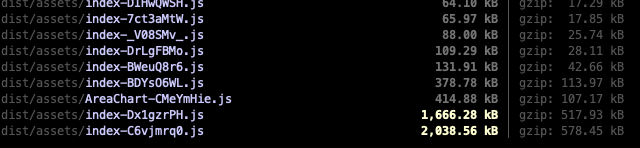
After diet...
Not much change...
Looking at large files again with manifest.json, there were some hefty libraries.
At this point, I had already unified libraries with similar functions and removed unused packages, so I couldn't immediately lighten or replace other libraries. Instead, I added code to split them into chunks in vite.config.mts:
build: {
    outDir: 'dist',
    manifest: true,
    rollupOptions: {
      output: {
        manualChunks(id) {
          if (id.includes('node_modules/lottie-web')) {
            return 'lottie-web';
          } else if (id.includes('node_modules/react-beautiful-dnd')) {
            return 'react-beautiful-dnd';
          } else if (id.includes('node_modules/react-json-view')) {
            return 'react-json-view';
          }
        },
      },
      external: './src/App.tsx',
    },
  },
Note that files specified as external must be loaded separately at runtime, so it's not recommended unless actually necessary. In most cases, you can achieve the same effect with code splitting (dynamic import).
Run the build again.
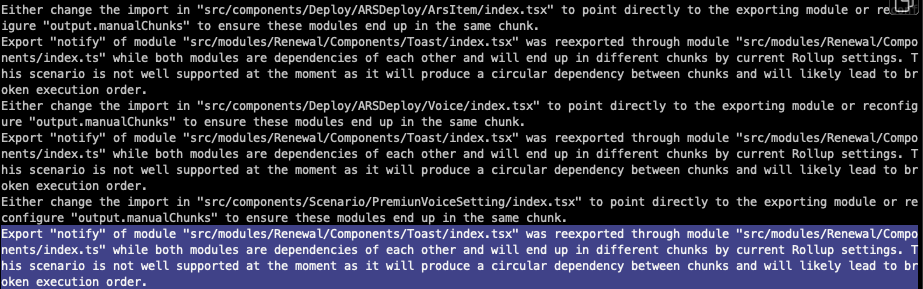
Current file structure:
// src/modules/Renewal/Components/Toast/index.tsx
import { toast } from 'react-toastify';
import { FontAwesomeIcon } from '@fortawesome/react-fontawesome';
import { faX, faTriangleExclamation, faCircleCheck, faCircleExclamation } from '@fortawesome/pro-solid-svg-icons';

import { Flex } from '../index';
import { BaseToast } from '../../Styles/Toast';

import './custom-toast.css';
import { Props } from '../../Interfaces/Toast';

const MessageIcon = ({ type, message }: Omit<Props, 'status'>) => {
  switch (type) {
   ...
  }
};

export const notify = ({ status, message, type }: Props) => {
  toast(
    ({ closeToast }) => {
      return (
        ...
      );
    },
    { autoClose: type !== 'error' ? 4000 : false },
  );
};
// src/modules/Renewal/Components/index.ts
export { default as Text } from './Text';
export { default as Tab } from './Tab';
export { default as Box } from './Box';
...
export { default as Badge } from './Badge';
export { default as Input } from './Input';
...
export { notify } from './Toast';
export { default as Table } from './Table';
Flex was being imported from index.ts (barrel file), so I broke the circular reference by importing directly:
import Flex from '../Flex';
Then, to cool my head, I removed the numerous any types scattered throughout the code. While this wasn't directly related to the Vite migration, after going through build -> fix errors -> build again -> fix more errors -> build yet again -> fix even more errors... I needed a break.
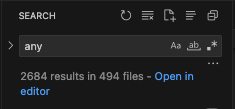
I corrected all any types used mainly in Select options, mouse events, keyboard events, or onChange handlers. Also, while doing this work, I removed any from code where type inference became possible after refactoring.
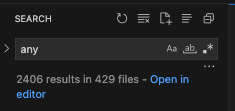
After working hard, 280 instances were reduced.
After cooling down for a bit, I dove back into the build work. At this point, the build was successful, and I was checking if features worked properly on the actual development server. Opening the developer tools revealed many accumulated warnings because polyfills weren't working properly.
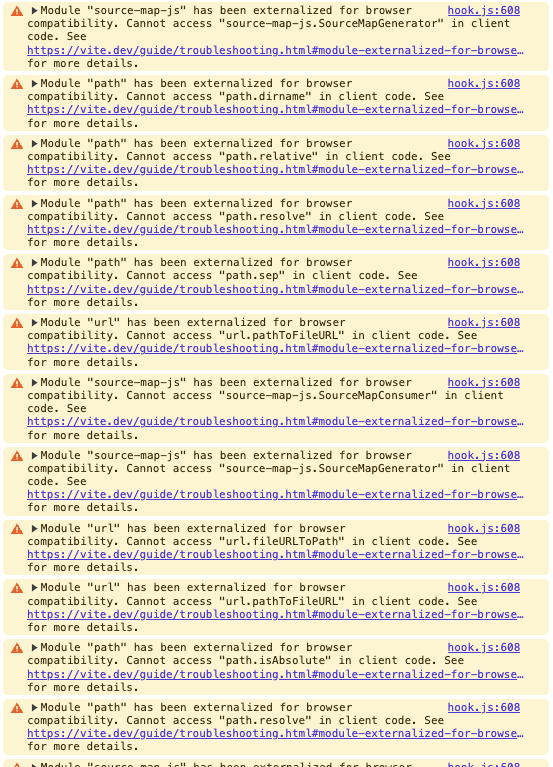
Reference documents https://tech.wonderwall.kr/articles/vite/ https://github.com/vitejs/vite/discussions/14966
I removed these warnings by referring to these links.
Here's my vite.config.ts file after all this work:
import { defineConfig } from 'vite';
import react from '@vitejs/plugin-react';
import svgr from 'vite-plugin-svgr';

import { visualizer } from 'rollup-plugin-visualizer';
import { nodePolyfills } from 'vite-plugin-node-polyfills';
import { NodeGlobalsPolyfillPlugin } from '@esbuild-plugins/node-globals-polyfill';
import path from 'path';

// https://vitejs.dev/config/

export default defineConfig({
  plugins: [
    react(),
    svgr({ include: '**/*.svg' }),
    nodePolyfills({ include: ['fs', 'path', 'url'] }),
    visualizer({
      emitFile: true,
      filename: 'stats.html',
    }),
  ],
  server: {
    host: '127.0.0.1',
    port: 3000,
    open: true,
    strictPort: true,
  },
  define: {
    global: 'globalThis',
  },
  build: {
    outDir: 'dist',
    manifest: true,
    rollupOptions: {
      output: {
        manualChunks(id) {
          if (id.includes('node_modules/lottie-web')) {
            return 'lottie-web';
          } else if (id.includes('node_modules/react-beautiful-dnd')) {
            return 'react-beautiful-dnd';
          } else if (id.includes('node_modules/react-json-view')) {
            return 'react-json-view';
          }
        },
      },
      external: './src/App.tsx',
    },
  },
  optimizeDeps: {
    esbuildOptions: {
      plugins: [NodeGlobalsPolyfillPlugin({ process: true })],
    },
  },
  resolve: {
    alias: {
      components: path.resolve(__dirname, './src/components'),
      constants: path.resolve(__dirname, './src/constants'),
      hooks: path.resolve(__dirname, './src/hooks'),
      images: path.resolve(__dirname, './src/images'),
      modules: path.resolve(__dirname, './src/modules'),
      services: path.resolve(__dirname, './src/services'),
      pages: path.resolve(__dirname, './src/pages'),
      'source-map-js': 'source-map',
    },
  },
});
Finally, run one more build test. To test in the same environment as production, I brought the Dockerfile locally and tested the build. (The test command here is really just for "testing" purposes, so set it arbitrarily. Of course, don't stage it in commits.)
"tt": "docker build -t test -f Dockerfile ."
Running it, as expected, an error occurs familiarly - it would be strange if it succeeded on the first try.
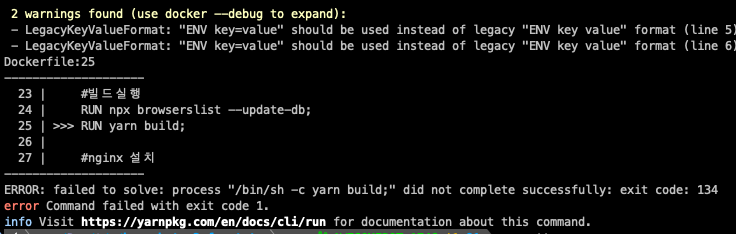
Run yarn build locally again. Since this also doesn't work, it seems Node.js is running out of memory, so:
"build": "NODE_OPTIONS=--max-old-space-size=4096 tsc && vite build",
After modifying the command to temporarily increase memory (this increases Node.js memory limit to 4GB)...

Running it again works. Container builds take more time than local builds because they're performing everything from package install without using build cache.
After that, I deployed to the actual development environment host with Docker server deployment as the final step.
Then, wondering if it really deployed with Vite, I added logs. Since Next.js projects show the NEXT_DATA object in the browser console, I borrowed this idea.
First, define an object in define within vite.config.mts:
  define: {
    global: 'globalThis',
    __BUILD_INFO__: JSON.stringify({
      buildTool: 'vite',
      buildTime: new Date().toISOString(),
      version: process.env.npm_package_version,
    }),
  },
And in vite-env.d.ts:
/// <reference types="vite/client" />
/// <reference types="vite-plugin-svgr/client" />
interface BuildInfo {
  buildTool: string;
  buildTime: string;
  version: string;
}

declare const __BUILD_INFO__: BuildInfo;
Finally in src/index.tsx at the root:
(window as any).__BUILD_INFO__ = __BUILD_INFO__;
... previous code
I did one more logging deployment.
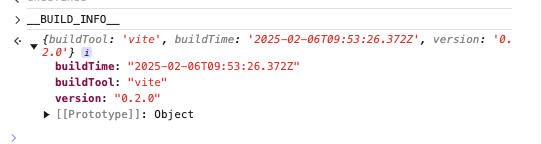
It shows up nicely. I'll keep this code for now and remove it after testing in production, and thus concludes this debugging adventure disguised as a migration...